
Attachable Sonic Screwdriver with left-hand and right-hand support
Sonic Screwdrivers
Vortech 14th Doctor Sonic Screwdriver
Built as a feature-rich sci-fi roleplay tool, this Sonic pairs an attachable screwdriver with a matching HUD and an ecosystem of interactive objects. Use it to scan the region, control compatible doors, trigger break/fix effects, toggle shield and flashlight modes, animate hand tricks, change emitter colors, and store or summon the Sonic from its dispenser.

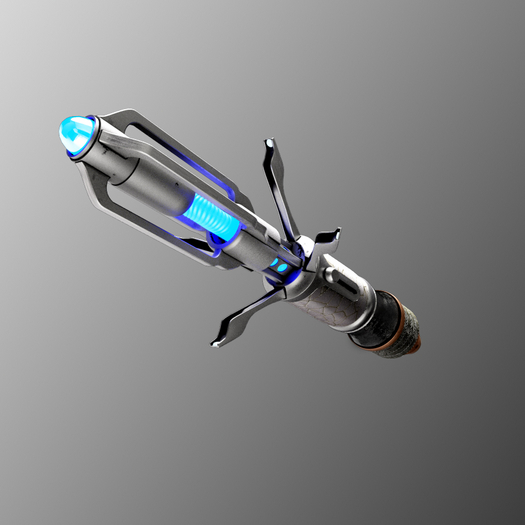
Product Family
Sonic Screwdrivers
Second Life wearable HUD-controlled roleplay tool
See all Sonic ScrewdriversFeatures
What It Does
Custom HUD with quick controls and pop-up menus
Manual extend, retract, pulse, and auto-extend modes
Region, parcel, avatar, location, environment, sim performance, and status scanner tools
Directional sim probe controls
Emitter color modes: Blue, Red, Green, Orange, Purple, and Pink
Flashlight and shield support
Random hand animations for throws, spins, and flicks
Package
What Is Included
- 14th Doctor Sonic Screwdriver
- Sonic HUD
- Sonic Dispenser
- Example Break object
- Vortech Vase interactive object
- Door Pack
- Public and owner door control scripts
- Break/Fix receiver example scripts
- Shield model
- Package/unbox controller
Ecosystem
Interactive Support
Break/Fix Objects
Objects with compatible receiver scripts can respond to Sonic Break and Fix commands.
Vortech Vase
Example interactive object that can be shattered and repaired.
Door Pack
Compatible doors can respond to Open, Close, Lock, and Unlock commands.
Shield Model
Shield object responds to Shield On and Shield Off behavior.
Sonic Dispenser
Stores the Sonic and returns it to the avatar's hand with visual effects.
Vortech TTC
Compatible TTC systems can receive lock, unlock, top-light, and interior-light commands.
Setup Summary
Setup Summary
- Unbox the product.
- Add the Sonic and HUD to your avatar.
- Wait about 15 seconds for scripts to initialize.
- Click the Sonic to resize it for your avatar.
- Adjust hand position in edit mode if needed.
- Use the HUD quick controls or click the HUD menu to access the full feature set.
Credits
Credits
- 3D Modeling: Lexii Lane.
- Feature and Interaction Design: Lexii Lane, Mishelle Rayna, and Christina Riederer.
- Visual Artwork: Lexii Lane and Christina Riederer.
- Sound Design: Christina Riederer.
- Bento Animation Assets: independent third-party artist.
- LSL Engineering and Script Development: Mishelle Rayna.